
If your heating is stuck on or won't turn on when you expect it to, here are a few simple steps you can take to check for a small communication issue with your smart thermostat system.
1. Check the Symptoms
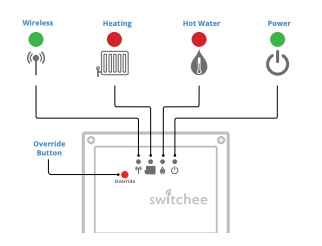
Look at your boiler receiver unit (BRU). This is the small box, usually near your boiler, that has indicator lights on it.
-
System working correctly: When your thermostat (SDU) asks for heat, the red light on the BRU turns on/off.
-
Possible communication issue: When your thermostat (SDU) asks for heat, the red light on the BRU does NOT turn on/off.
2. Check the Boiler Receiver Unit (BRU) Lights
a. The wireless light
The BRU has a green light above the wireless symbol.
- If the green light is FLASHING slowly: This suggests a small communication issue between your smart thermostat (SDU) and the BRU.
b. The heating light
Let's see if the thermostat is sending a signal to the BRU.
- On your thermostat (SDU), turn the target temperature up so it is higher than the current room temperature.
- Now, look at the BRU. Do you see a red light appear above the radiator symbol to show the boiler is being asked to turn on?
- If the red light does NOT come on, this confirms a small communication issue.
Note: If the red light DOES come on but your heating still doesn't work, there may be an issue with the boiler itself (not the communication).
3. Attempt a quick re-pairing (Optional)
If you're comfortable, you can try to re-establish the connection between your thermostat and the BRU. If this doesn't work after a few tries, please get in touch.
On the thermostat (SDU)
- Tap the spanner icon in the top left corner.
- Tap next > next.
- Tap admin - the PIN is 0123 - Tap done.
- Find and tap 'pair to receiver unit'.
- If you see an existing pair, tap 'reset pair' to delete it.
On the Boiler Receiver Unit (BRU)
- Press the override button on the BRU for about 5 seconds.
- The green wireless light on the BRU should start flashing slowly. This means it is ready to pair.
Finish the pairing
- Go back to the thermostat (SDU) and tap 'pair'.
If a 'pairing timeout' message appears, please repeat all the steps in this section two more times.
If you get the 'pairing timeout' message 3 times in a row, the device is faulty and will need to be replaced.
4. What happens next
Temporary fix: Use the override button
If a communication issue has been found, you can still turn your heating and/or hot water on and off manually using the override button on the BRU.
- Warning: When using the override, you will not be able to control the temperature - it will simply turn the heat on or off.
We will arrange a replacement
We understand this is frustrating. We will raise a request for the faulty device to be swapped out and replaced.
- Your details will be passed on to our trusted network of subcontractors or your housing provider.
- They will contact you within 5 working days to arrange a visit.
Since you can still manually control the heat with the override button, this is not classified as an emergency call-out.
Did these steps help you confirm a communication issue, or did you find that the BRU's red lights were working correctly?
For more support, contact our resident support team directly:
Tel: 0800 133 7957 | Email: support@switchee.com