
This quick guide explains how to use your Switchee smart thermostat to control your heating simply and comfortably.
It covers the basics, including adjusting the temperature, setting a heating schedule, and understanding how your thermostat helps keep your home warm while avoiding unnecessary energy use.
Use this guide if you’re new to Switchee or just want a simple overview of the main features. For more detailed instructions, you can also download the full user guide.
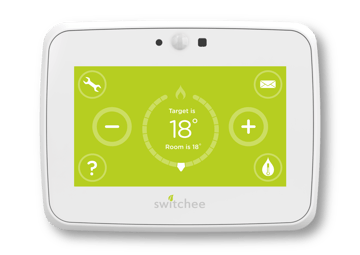
What is a Switchee smart thermostat?
Switchee is your new heating control. It’s a smart thermostat that’s easy to use, either from the screen on your wall or from your phone using the free Switchee Resident app (available in the Apple and Google Play stores).
You can:
-
Turn your heating on or off
-
Adjust the temperature
-
Set a heating schedule that fits your routine
-
View room temperature at any time
Setting your temperature
The smart thermostat makes it easy to choose a temperature that feels right for you.
Most people find 18°C to 21°C comfortable.
You can adjust the temperature anytime using the Switchee screen or app.
The Switchee smart thermostat also lets you run your heating on a schedule, so your home warms up when needed and turns down when you’re out or asleep. It’s a simple way to stay warm while avoiding energy waste and keeping your bills down.
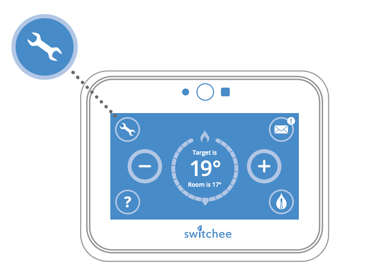
Setting a heating schedule
To set up a schedule on your Switchee smart thermostat
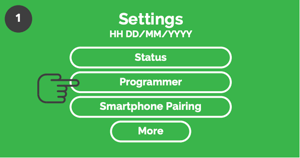
In the settings menu select programmer.
This will take you to the schedules menu
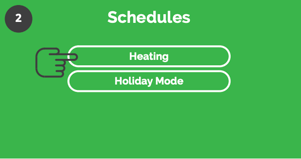
There you will see two options. Press heating.
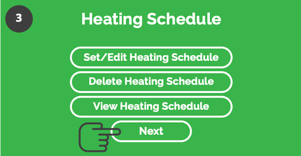
This takes you to the heating schedule menu.
Here you can set, edit, delete or view your own heating schedules.
Press next to see built-in schedules
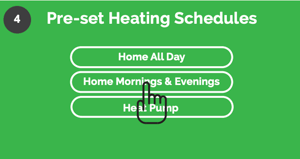
Now select a schedule that fit's your day (e.g "Home mornings & evenings") and then click the apply button.
Download the Switchee smart thermostat quick guide here.
For more support, contact our resident support team directly:
Tel: 0800 133 7957 | Email: support@switchee.com