
If your heating is not coming on, but the control lights on your receiver box are responding to your thermostat, the issue is likely with the main heating unit (your boiler or heat pump).
Here is a step-by-step guide to confirm this, followed by who you need to contact.
1. Test the thermostat connection (SDU to BRU)
We need to check that your wireless thermostat (SDU) is successfully communicating with the Boiler Receiver Unit (BRU). The BRU is the small box, usually next to your boiler.
On your thermostat (SDU):
- Turn the target temperature UP so that it is clearly higher than the current room temperature shown on the display. This tells the system you need heat.
On the Boiler Receiver Unit (BRU):
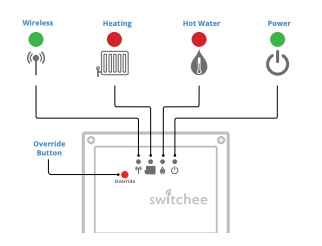
- Look for the red light above the radiator symbol .
- Wait 10-20 seconds.
-
If the red light turns on: The thermostat system is working correctly! It has successfully sent the signal asking for heat.
-
If the red light stays off: You have a small communication issue. Please refer to the previous guide to try the re-pairing procedure.
Now try turning off and observe if red light turns off
2. Confirm a boiler/heat pump issue
If the red light on the BRU has turned on, it confirms the following:
Since the BRU light is on, the problem is that your boiler or heat pump is not starting up, even though it has been asked to.
Next steps to check:
Before calling for a repair, check these three simple things on your boiler or heat pump:
- Check the display: Does your boiler have a digital screen? Look for a fault code (a letter and numbers like F.75, E.133, etc.). Note this down.
- Check the pressure: On the front of your boiler, there is often a round gauge (like a small clock). For most systems, the pressure should be in the green zone, usually between 1 and 1.5 bar when the system is cold. If it is too low, this can stop the boiler from firing.
- Check the power/switch: Ensure the power switch for the boiler or heat pump (often near the unit on the wall) hasn't been accidentally turned off.
3. Contact your housing provider / repairs team
As your thermostat system is proven to be communicating correctly, this is an issue with the main heating appliance itself (the boiler or heat pump) and requires a qualified heating engineer to investigate.
What to do now:
- Immediately contact your housing provider or repairs team.
- Explain that your Switchee smart thermostat is working (you saw the red light on the BRU turn on), but your boiler/heat pump is not responding or producing heat.
- If you found a fault code or low pressure, mention this to help speed up the diagnosis.
Important: Your housing provider will determine the urgency of the repair based on their own policies (e.g., if you have hot water, the time of year, etc.). They will advise you on the expected time for an engineer visit.
For more support, contact our resident support team directly:
Tel: 0800 133 7957 | Email: support@switchee.com